AL Foundation App - User guide
How to set up and use the app in Business Central.
1. What AL Foundation App is
AL Foundation App is the base the AppLibra apps are built on. It is installed together with them and has no daily work of its own: it holds what the apps share, so every app does the same thing in the same way. What it keeps:
- the sales and purchase entries, written when documents are posted;
- a stable identifier for documents and lines, which the apps use to link their own data;
- the setup of the item charges that the apps add to documents on their own;
- the unit of measure the company uses for weight, pieces, liters, area and cubage;
- the item types, a classification of the items that the apps use as a filter;
- structures and hierarchies of customers, items, salespeople and free groups.
Its pages carry the tag (FND), so searching for FND in Business Central lists them all. In the AppLibra role center they are under Foundation (FND).
2. Setup
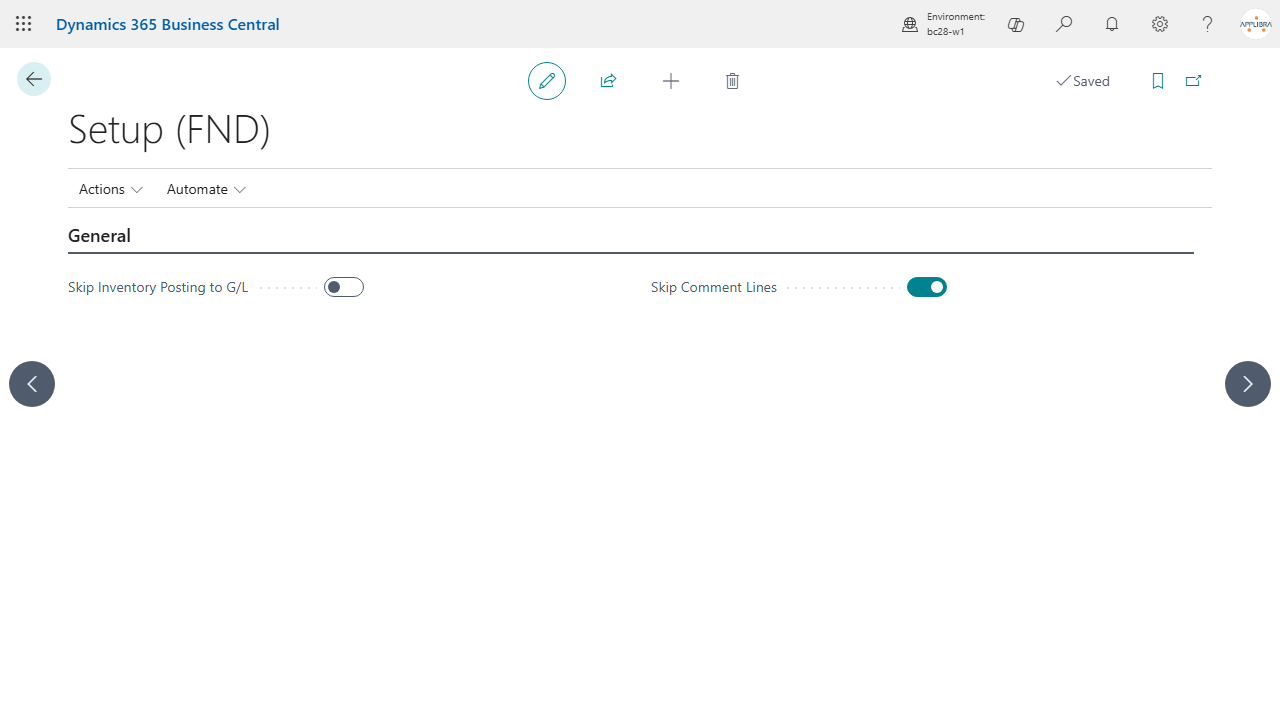
Open Setup (FND). The page creates the setup the first time it is opened. It is also in the Business Central manual setup list, where you look for the setup of any other app.
- Skip Inventory Posting to G/L: when you post item entries, the inventory value is not posted to the general ledger and the inventory posting setup is not checked. You post the value later with the standard Post Inventory Cost to G/L batch job.
- Skip Comment Lines: the comment lines of a document, the ones with an empty type, are left out of the sales and purchase entries. It is on by default.
3. Units of measure by type
Several apps need to know which unit of measure is the company's unit for weight, or for pieces, without asking you every time. On the standard Units of Measure page two fields say it:
- Type: what the unit measures: weight, pieces, liters, area or cubage. Other apps can add types of their own.
- Priority: which unit wins when several units have the same type. The highest priority wins and, when the priority is the same, the first unit by code.
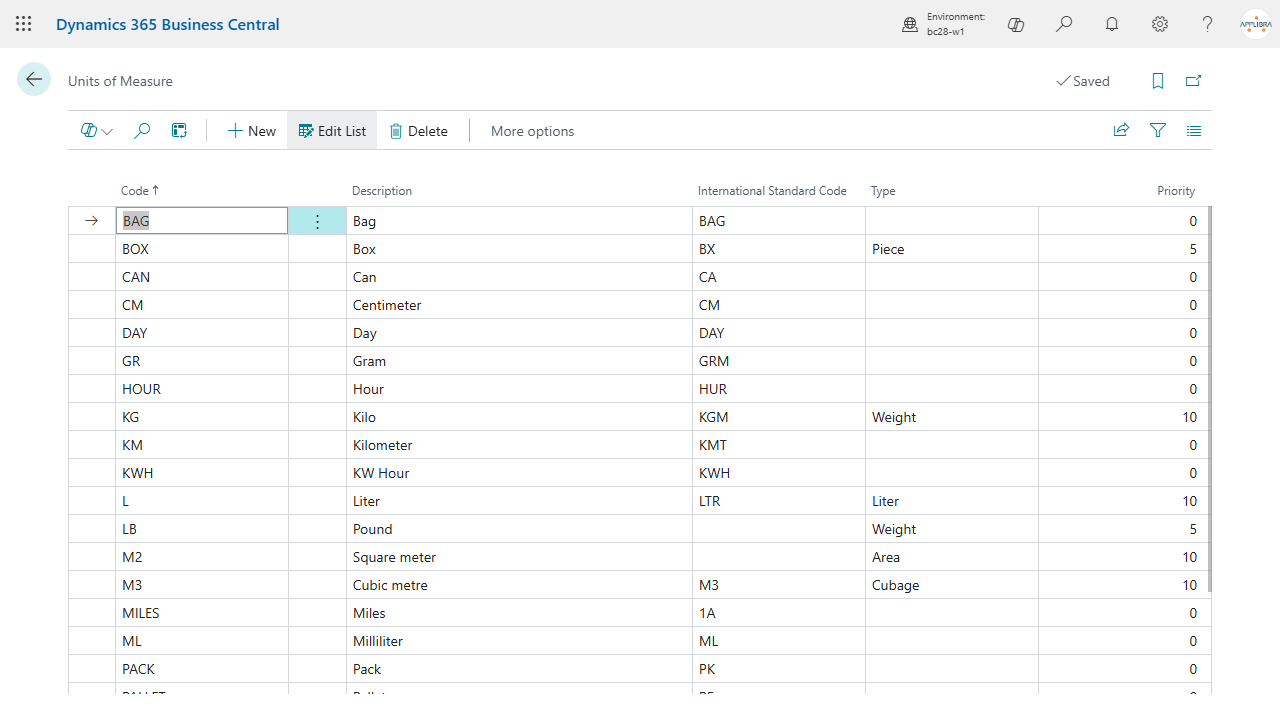
Next to Type and Priority a third field, Kg per Unit, is for the units classified as weight: how many kilograms one unit weighs, 1 for KG, 0.001 for G, 0.45359237 for LB. It can be filled only on a unit whose type is weight, and when the type changes to something else it is cleared.
When you classify a unit as weight from the page and it has no ratio yet, the app proposes one from the International Standard Code of the unit, when it is one of the UN/ECE weight codes (KGM 1, GRM 0.001, MGM 0.000001, HGM 0.1, DTN 100, TNE 1000, LBR 0.45359237, ONZ 0.028349523125, STN 907.18474, LTN 1016.0469088), or else from the code of the unit itself, for KG, G and LB. A ratio already written is never overwritten, and changing only the International Standard Code proposes nothing. The action Propose Kg per Unit does the same on request, for the unit you are on: it fills the ratio only when the unit is classified as weight and has none; otherwise it tells you that there is nothing to propose.
The weight unit of the company, the one chosen by Type and Priority, is the weight unit with or without its ratio. Another unit classified as weight counts as a weight only when both it and the company weight unit have their ratio: then the app converts weights between the two units, and 10 LB are 4.5359237 KG. Without the ratios the company weight unit is the only weight, as in the earlier versions. When you give a second unit its ratio while the company weight unit has none, a message tells you that the unit is not treated as a weight until the company unit has its ratio too.
The KG that the app creates or classifies by itself, when no unit is classified as weight, gets ratio 1 and, if it has none, the International Standard Code KGM. When you update from an earlier version, the weight unit of the company gets its ratio automatically, if it follows from its International Standard Code or from its code; the other units classified as weight stay empty until someone fills them, from the page or with the action.
The apps that write weights use the ratio from the versions built for this version of AL Foundation App: until they are updated, leave the ratio of a second weight unit empty.
4. Item types
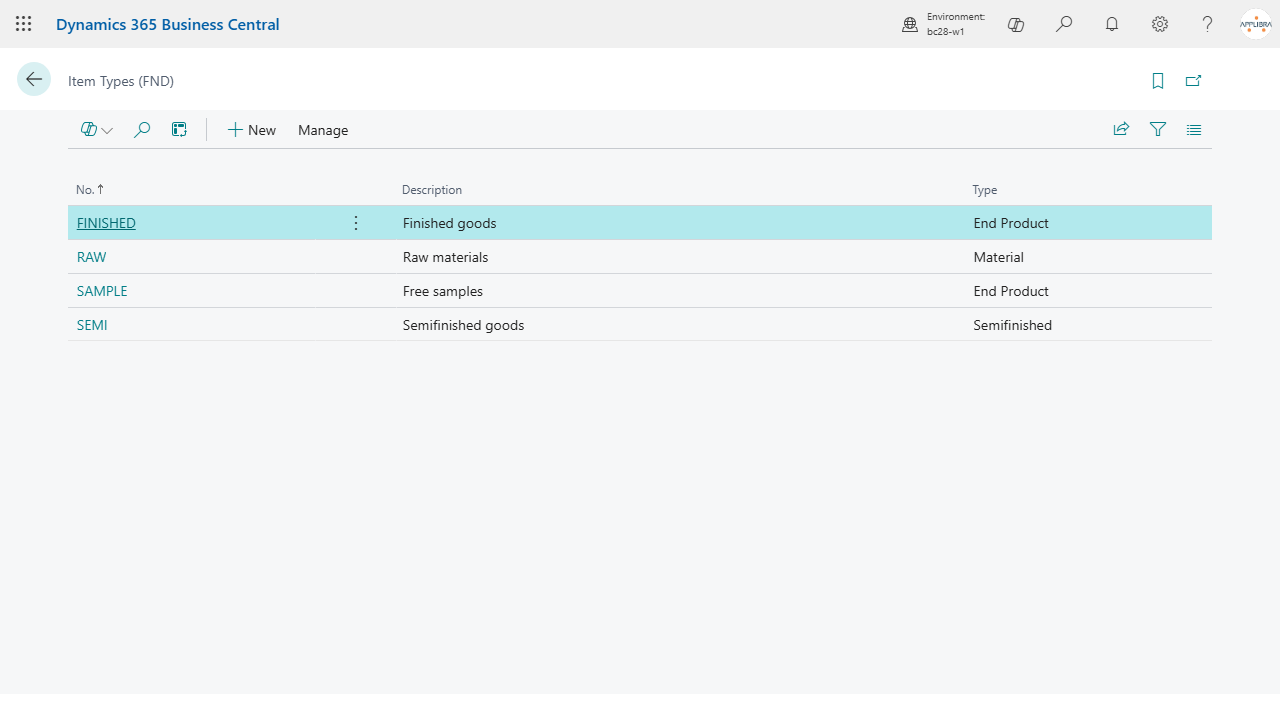
Open Item Types (FND). An item type has a code, a description and:
- Type: the nature of the items, such as material, semifinished or end product. Other apps add values of their own, for example pallet, package or tax sticker.
- Skip Price Check: sales lines with items of this type can have no unit price. The apps that require a price on sales lines skip the check for these items.
5. Item charge setup
Some apps add item charge lines to a document on their own: excise, tax stickers, free gifts, waste electrical equipment, processing charges. Item Charge Setup (FND) is where you say which item charge each of them uses. One row per charge type and code:
- Item Charge Type: the kind of charge. Each app brings its own types.
- No.: the code of the setup within its type.
- Item Charge Code: the item charge that is added to the document. Only item charges of the same type can be chosen: the type of an item charge is set on Item Charges.
- Keep Gen. Prod. Posting Group and Keep VAT Prod. Posting Group: the charge line keeps the posting groups of the line it refers to, instead of those of the item charge.
When you delete a document line, the charge lines that refer to it are deleted with it.
6. Certifications
Certifications (FND) is a list of codes with a description. You enter the code in the field Certification No. on sales and purchase orders and invoices. The lines you add after that take it from the header; the lines that are already there do not change. When you invoice shipments or receipts, the invoice lines take it from the shipped or received lines.
7. Sales and purchase entries
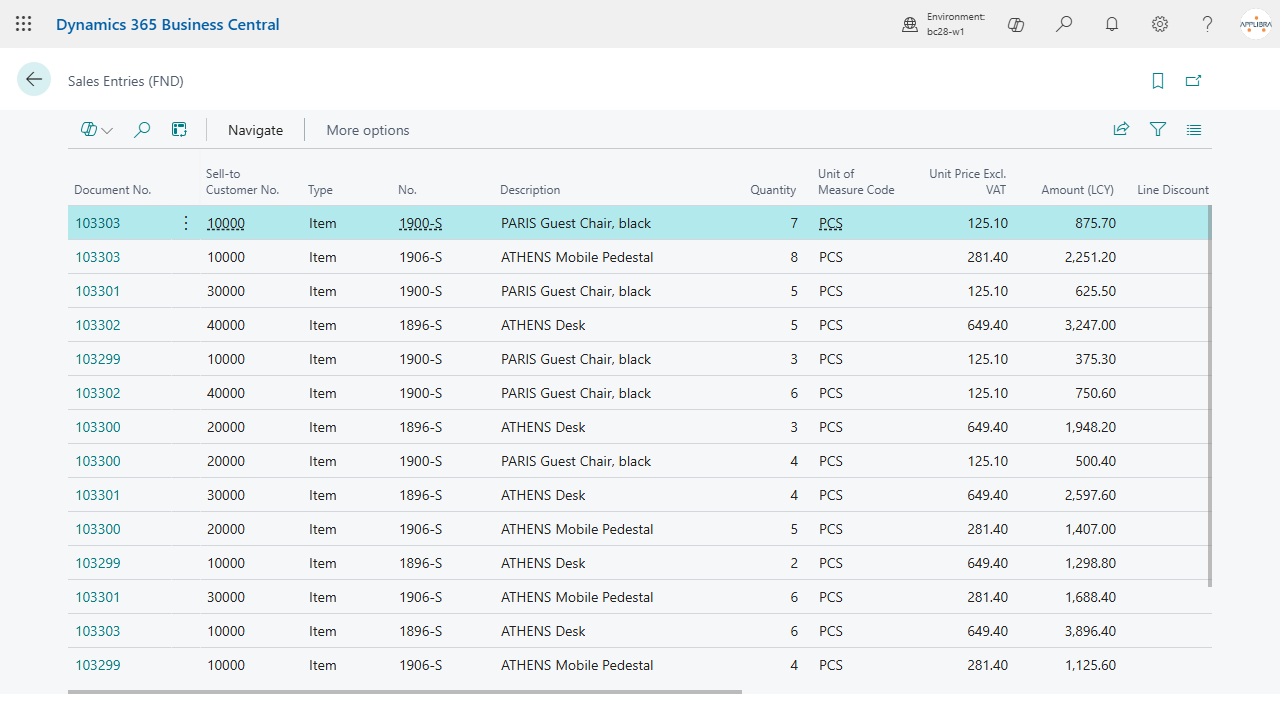
When a document is posted, the app writes one entry for each document line, with the fields of the header next to it: customer or vendor, salesperson, dates, payment terms. The apps read these entries for commissions, bonuses, statistics and business intelligence; you can read them too.
- Sales Entries (FND): posted sales invoices and credit memos. Amounts are in local currency, with the amounts in the currency of the document next to them.
- Purchase Entries (FND): posted purchase invoices and credit memos, with year, month, week and weekday of the document date.
- Sales Shipment Entries (FND): posted shipments and return receipts, and invoices and credit memos too. The document type tells them apart.
- Purchase Receipt Entries (FND): posted receipts and return shipments, and invoices and credit memos too.
Record Map ID (FND) lists the identifiers given to documents and lines. It is there for checking: the apps use the identifier to link their data to a document, so the link holds whatever the document number becomes.
Recalculate Entries (FND) rebuilds the entries of a period from the posted documents. Enter the posting dates and choose which entries to rebuild. An entry that exists is replaced and keeps its identifier; one that is missing is created. Use it after a data migration, or when the entries of a period do not match the posted documents.
8. Structures and hierarchies
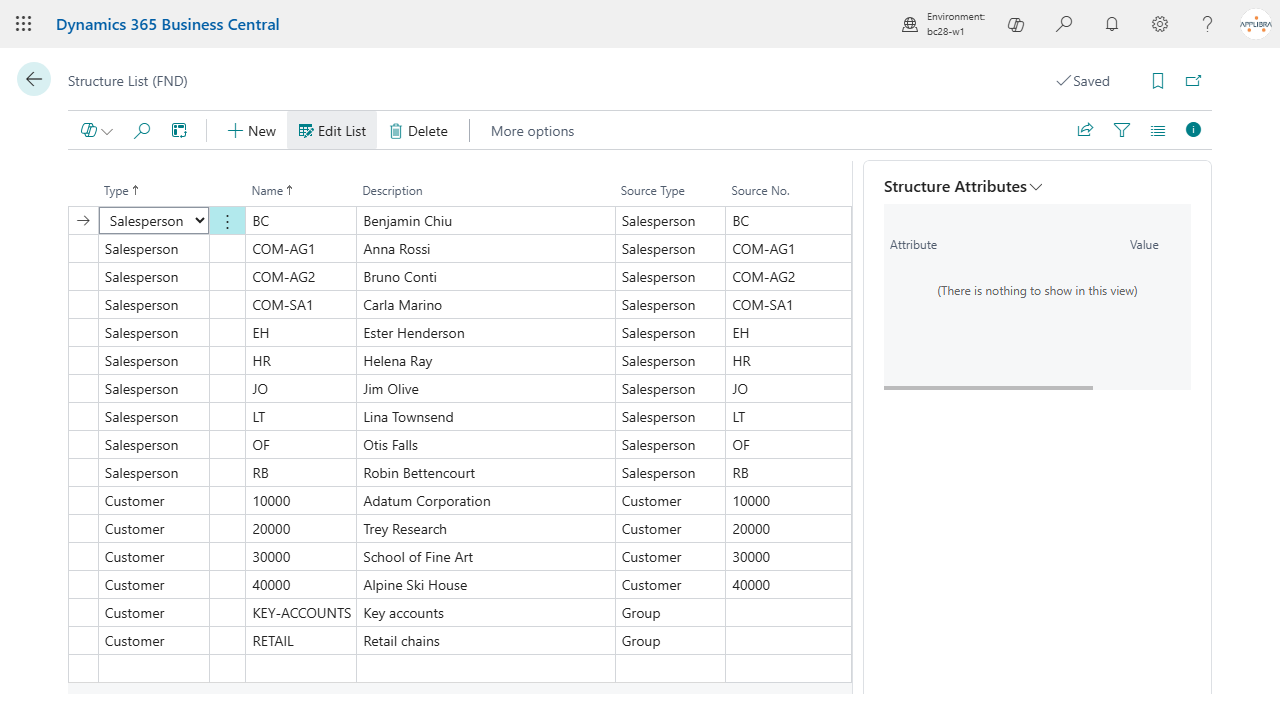
A structure is a node: a free group, or a record such as a customer, a vendor, an item, a salesperson, a customer price group, a customer discount group or a campaign. Hierarchies put structures one under the other, and the apps use them to decide what applies to whom: the agents under a super agent, the customers of a bonus agreement, the price groups of a price list.
- Hierarchy Templates (FND): a template says what its hierarchies are for, and which pages show and set them up. The apps create their own templates.
- Structure Batches (FND), from the action Batches of a template: a batch is one hierarchy. Its status is Open, Certified or Closed. Lines and attributes can be changed only while the batch is open.
- Structure List (FND): the structures, with the record each one stands for. When you fill in the source number, name and description come from that record.
9. Fields added to the documents
AL Foundation App also holds a few fields that other apps read:
- Payment Bank Account No.: the company bank account for the payment. On the customer card it is the usual one, and new sales documents take it from there; from the document it goes to the customer ledger entry and to the sales entries.
- Certification No.: see section 6.
- Ticket Type, Number, Date, Fiscal Reference on sales invoices and credit memos: obsolete from version 28 and removed in version 28.0.26 of October 2026. They held the fiscal receipt already issued for the sale. Receipts do not belong to the foundation of the apps: no app sees or writes them any more. The values already recorded stay in the database, because the platform does not drop the columns, but the pages no longer reach them.
- Transportation By and Shipment Time on sales and transfer orders: who takes care of the transport, and the time of day when the goods are shipped.
10. What the two roles can do
AL Foundation App ships two assignable permission sets.
- AL Foundation App - User (
ALPFND-USER) is what every user of an AppLibra app needs. The entries and the identifiers are written by the app while documents are edited and posted, so whoever posts must be able to write them. The setup, the item types, the item charge setup and the certifications are readable, not editable. - AL Foundation App - Administrator (
ALPFND-ADMIN) includes the user role and adds the setup tables and full control over the entries.
Whoever gets the permission set of an AppLibra app needs the user role too. Assign it together with the set of the app, unless the guide of that app says that its set already includes it.
Upgrading from an earlier version
Up to version 25 the permissions of the app were in a single set, AL Foundation App. The upgrade removes that set and replaces it with AL Foundation App - Administrator, which grants the same permissions. The move is automatic: whoever had the old set assigned gets the new one, and if the old set was included in a permission set of your own, your set now includes the new one instead.
There is one case the upgrade cannot cover: if you listed the old set in the License Configuration, among the permissions Business Central gives to new users, that configuration has to be redone by hand with the new set. Business Central does not let an app change it. Existing users are not affected.
11. Italian localization
AL Foundation App IT is the Italian localization of the app: a separate offer for the Italian market, which installs AL Foundation App with it. It has no pages of its own.
- Italian fields in the sales shipment entries. Project code and tender code of the electronic invoice, customer purchase order number, activity code, operation type, operation occurred date, bank account, payment discount and due date are copied from the posted document into Sales Shipment Entries (FND).
Up to version 25 the localization also showed the fiscal receipt fields on the sales invoice and wrote the receipt in the electronic invoice. From version 28 it no longer does, and from version 28.0.26 of October 2026 the fields are removed (section 9). If you used them, contact AppLibra.
Its permission set, AL Foundation App IT - User (ALPFNDIT-USER), includes the user role of AL Foundation App. Up to version 25 the permissions were in the set AL Foundation App IT: the upgrade moves assignments and inclusions to the new set, as described in section 10.