AL License and Trial Management
AL License and Trial Management - User guide
How to set up and use the app in Business Central.
1. Concepts in one minute
- AL License and Trial Management is installed together with the AppLibra apps: every paid AppLibra app checks here whether it can work.
- The trial of an app starts on the day you save the setup of that app, and lasts one month. Saving the setup again does not restart it.
- A license belongs to one app, or to one module of an app, and to one Business Central environment. A license copied to another environment does not work.
- Dependencies are included. An AppLibra app used by another licensed AppLibra app needs no license of its own: AL Tracking, for example, when AL Catch Weight Management uses it. Used directly, the app needs its own license.
- Purchased licenses arrive by themselves: a daily update brings them into the environment.
- License Setup (LIC) holds the license key of the environment and the start of the expiry reminders. It is created the first time the page is opened.
- When an app cannot be used, the message names the app with its tag and says what is missing and where to find it.
2. Prerequisites
- Business Central 28.0 or higher (Cloud/SaaS).
- The dependency installed: AL Role Center.
- Permissions: two assignable permission sets. Give ALPLIC-USER (AL License - User) to every user of an AppLibra app: it covers the license checks, the trial, the reminders and the read-only license pages. Give ALPLIC-ADMIN (AL License - Administrator) to whoever manages the licenses: it includes the user role and adds License Setup (LIC), the removal of a license and the update on demand. A user who opens License Setup (LIC) without the administrator role gets a permission error, which is the expected behaviour.
- Users who had the previous permission set AL License keep their access: the update moves to ALPLIC-ADMIN both the user assignments and the inclusion of the old set in your own permission sets, including those created from user groups. One thing is left to do by hand: if the old set was among those given automatically to new users by license, replace it with ALPLIC-ADMIN in the license configuration.
You reach the app from Tell Me: search a page name, for example "License Setup (LIC)", or simply the tag "LIC" to list every page of the app. The pages are also in the License and Trial Management (LIC) group of the Business Manager, Administrator and AppLibra role centers, and License Setup (LIC) is listed in Manual Setup.
3. Setup
3.1 Open License Setup (LIC)
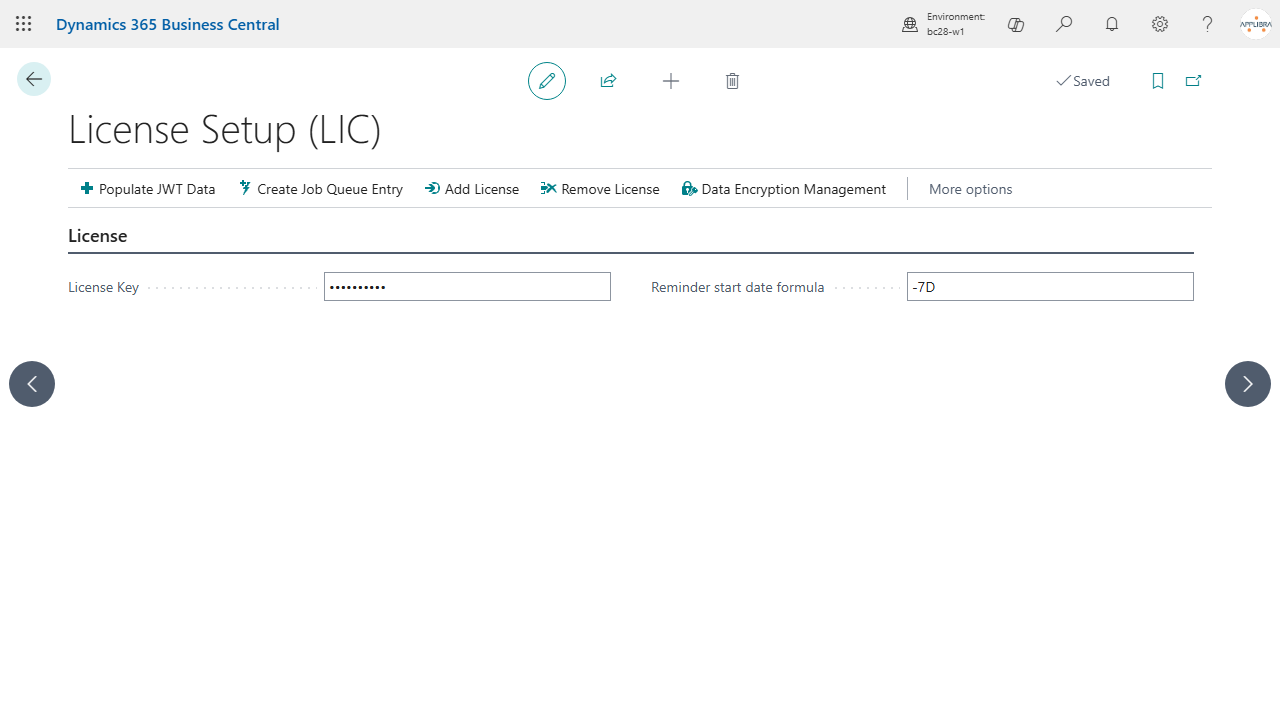
Open License Setup (LIC). The first time, the page creates the setup with its default values, and from that moment the daily update can bring in the licenses you purchase. Until then, administrators get a notification that asks to complete it.
3.2 License key
The License Key identifies your environment with the AppLibra license service. It normally arrives by itself with the first license update after a purchase. If AppLibra gives it to you directly, enter it here. Remove License removes the key from the environment. Users who are already working notice a removed key or license within ten minutes.
On Business Central on-premises, the key can be edited only when data encryption is enabled: Data Encryption Management opens the standard page.
3.3 Reminders
Reminder start date formula decides when the reminders before the expiry of a license start. The default is -7D: a reminder a day during the last seven days. With -1M the reminders start one month before the ending date. Leave the field empty to turn the reminders off.
3.4 Daily update
When AL License and Trial Management is installed, it creates a job queue entry that updates the licenses every day, in the morning. If the entry was deleted, Create Job Queue Entry creates it again. Populate JWT Data restores the default connection to the AppLibra license service.
4. Licenses
4.1 Licenses (LIC)
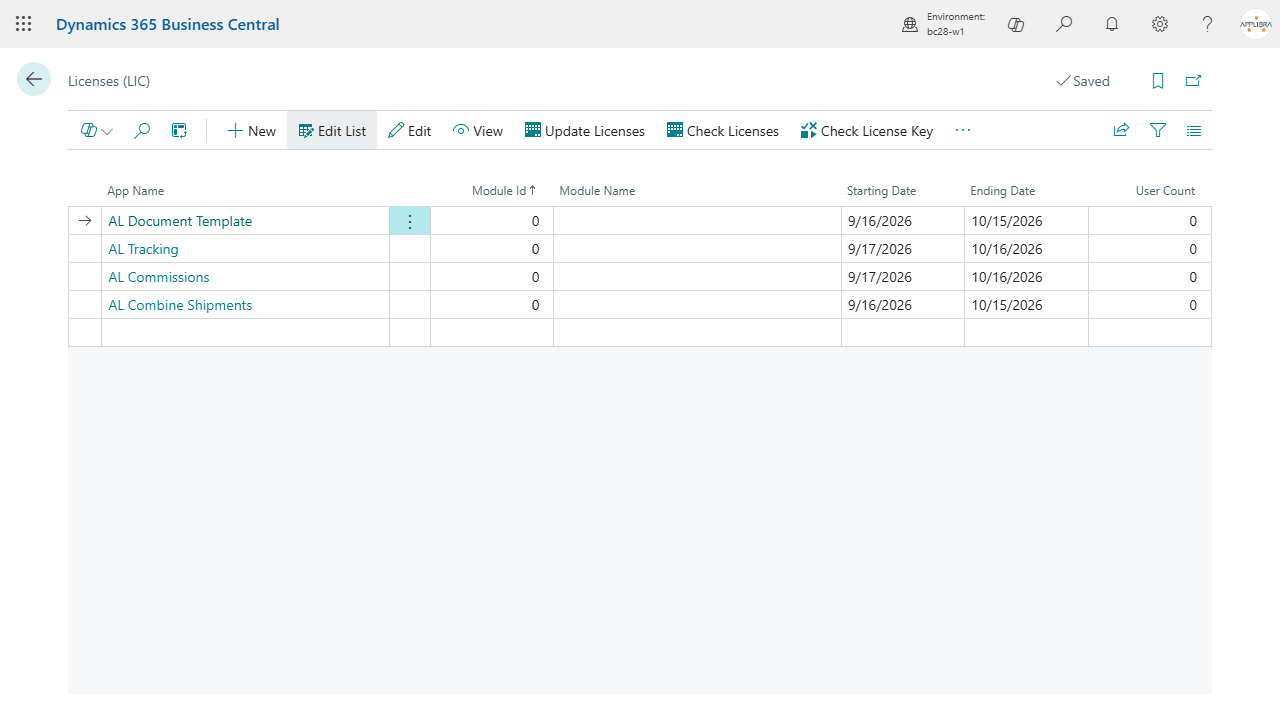
Licenses (LIC) lists the licenses of the AppLibra apps installed on the environment: app, module, starting and ending date, users. From the list:
- Update Licenses reads the licenses again and updates their users and ending date;
- Check Licenses checks the selected licenses and shows whether each one is valid;
- Check License Key shows whether the license key of the environment is set;
- Refresh License List brings in the licenses purchased for the environment, like the daily update.
4.2 License Card (LIC)
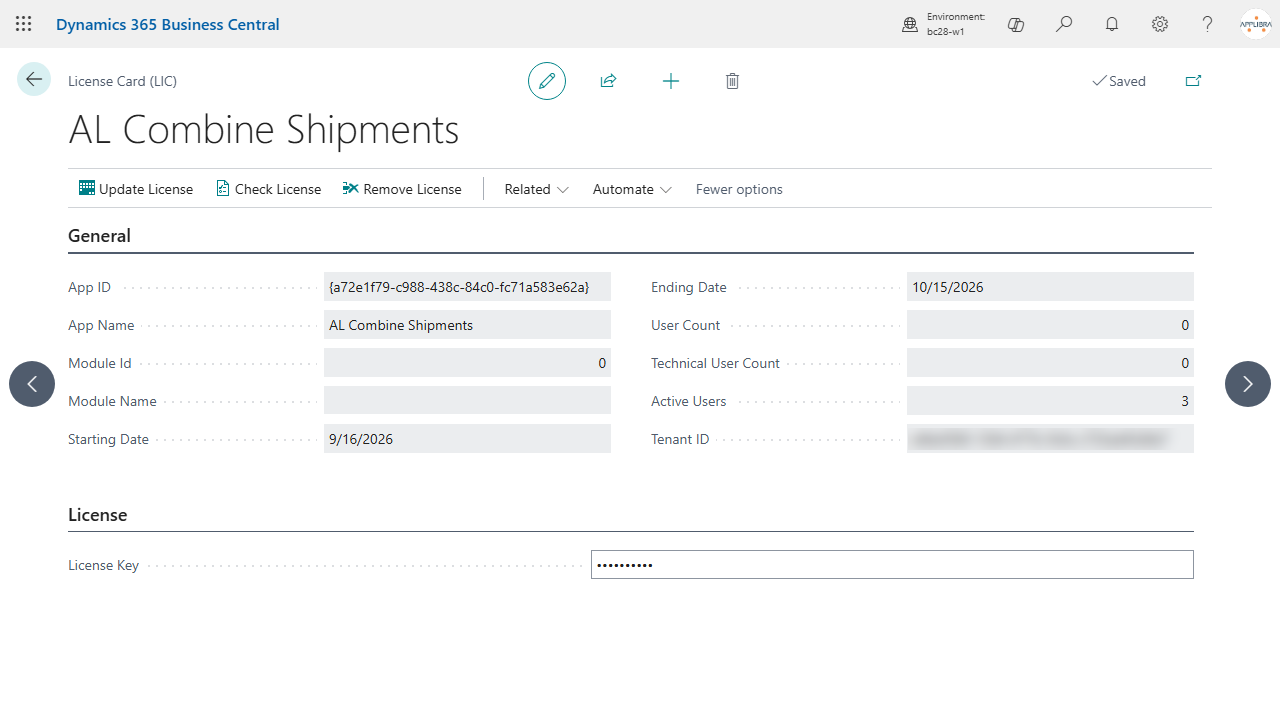
The card shows one license: users, technical users, active users and the dates. Check License tells whether the license is valid. License Subscriptions (LIC) opens the history of the subscriptions of the license, where Activate License Subscription makes a subscription the active one.
4.3 Role center
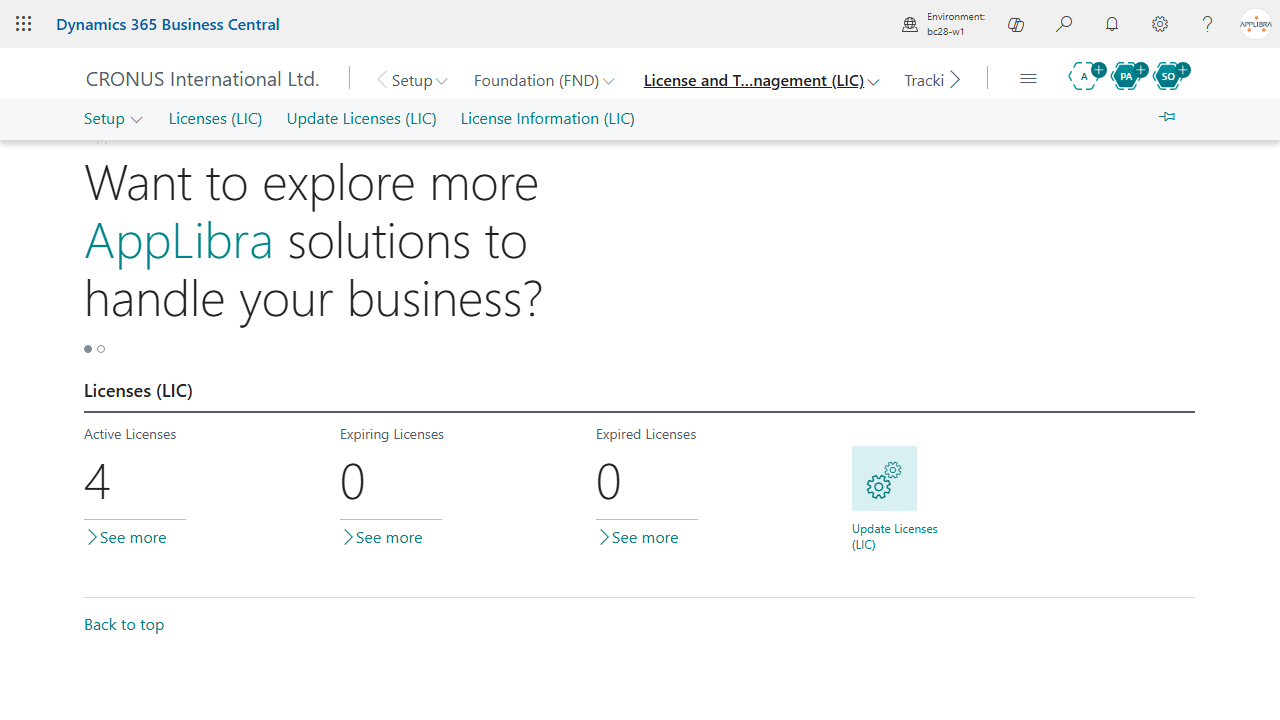
The Licenses (LIC) cue of the AppLibra role center counts the active, expiring and expired licenses; a click opens the licenses. Update Licenses (LIC) runs the license update at once. An expiring license is one whose reminders have started.
5. Trial and purchase
- Install the AppLibra app: AL License and Trial Management comes with it.
- Open the setup page of the app and save it: the trial starts on that day and lasts one month.
- At the next sign-in, a welcome notification can show the ending date of the trial.
- From seven days before the end, a reminder a day tells how many days are left and how to contact AppLibra.
- When you purchase, the license arrives with the next daily update, or at once with Update Licenses (LIC).
- When a trial or a license ends without a renewal, the app stops with a license message.
Apps made of modules, such as AL Bridge, license each module separately: every module has its own trial and its own license.
An AppLibra app used by another AppLibra app runs under the license of the app that uses it, trial included. Its own trial and license matter only when you use it directly.
6. When an app cannot be used
AL License and Trial Management stops an app only when a user works with it, and the message says what to do.
- "Set up <app> (<TAG>) before you use it": the app has no license yet because its setup was never completed. The message names the app with its tag, the same tag its pages carry: search for the tag with Tell Me (Alt+Q), open the setup page of the app, complete it and save it, and the trial starts.
- "The license of <app> cannot be verified because AL License is not set up": the app has a purchased license, but License Setup (LIC) was never opened. Choose Open License Setup (LIC), then update the licenses.
- "The license of <app> cannot be verified because the license key of this environment is missing": open License Setup (LIC) and enter the key, or contact AppLibra.
- "The License is not correct for the app": the license is not valid for this environment, or it has expired. Check it from Licenses (LIC) and contact AppLibra to renew it.
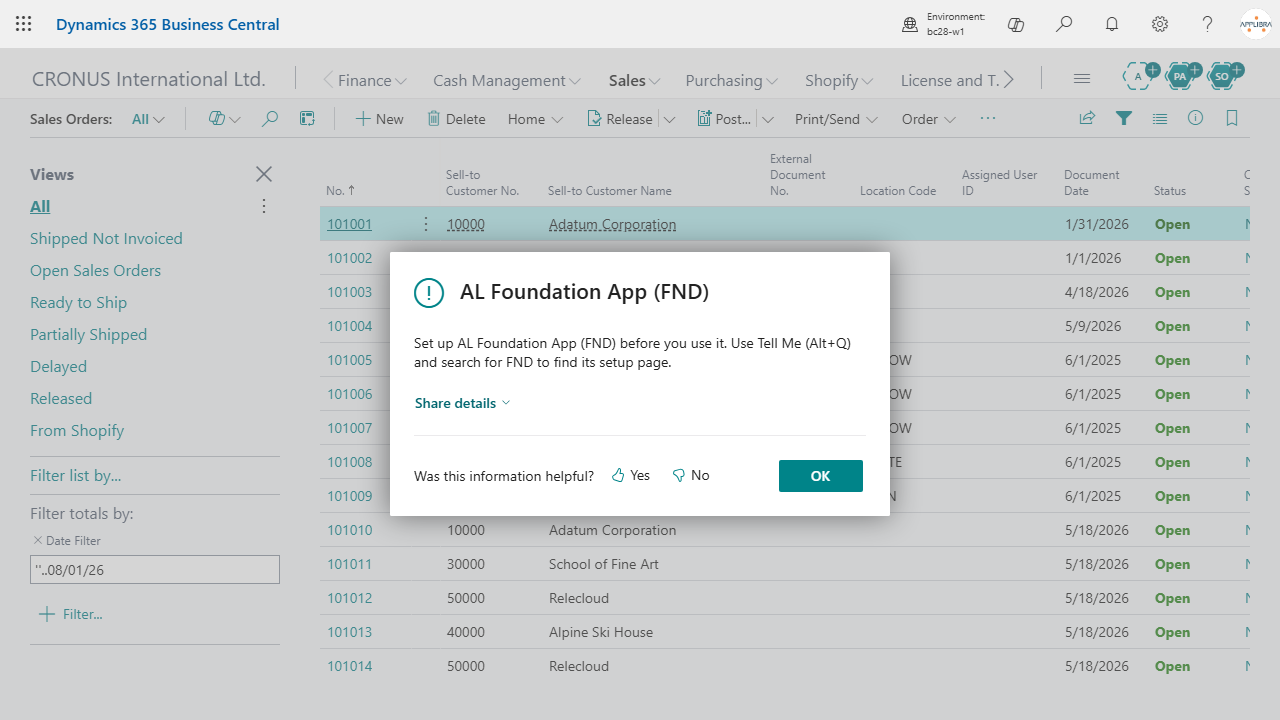
Nothing is ever blocked at sign-in or in background tasks: the reminders and the notices arrive as notifications, and the daily update waits until License Setup (LIC) is completed.
7. Troubleshooting
- The trial did not start: the trial starts when the setup of the app is saved. Open the setup of the app from Tell Me, or from Manual Setup, and save it.
- A purchased license is missing: open License Setup (LIC) once, then run Update Licenses (LIC). If it is still missing, contact AppLibra with the name of the environment.
- No reminders: check Reminder start date formula in License Setup (LIC); an empty formula turns the reminders off.
- Permission errors: assign ALPLIC-USER to every user of the AppLibra apps and ALPLIC-ADMIN to whoever manages the licenses.
For help: https://applibra.com/contactus.